Des factures qui s'écrivent toutes seules, des livres qui se clôturent tout seuls.
Terminez une vente ou une réparation et la facture est déjà prête : votre mise en page, la bonne ventilation de TVA, une référence de paiement structurée. Les factures fournisseurs sont lues par l'IA, les paiements bancaires se rapprochent automatiquement, et votre comptable reçoit des données structurées au lieu d'une boîte à chaussures.
Cinq moments où la paperasse vous vole votre soirée.
La facturation d'une bijouterie n'est pas celle d'un magasin de chaussures. Réparations, retours de pièces de grande valeur, rachats d'or, déclaration de TVA trimestrielle. Voici à quoi ressemble chacun de ces moments avec et sans Gem Logic.
Ce n'est pas un logiciel supplémentaire. La facture naît de la vente ou de la réparation, donc les chiffres que votre comptable voit sont les mêmes que ceux avec lesquels votre comptoir a travaillé.
Les tâches fastidieuses de comptabilité, supprimées.
Ce ne sont pas des modules complémentaires que vous achetez séparément. Ils sont fournis avec le même système que votre comptoir utilise déjà.
Vous téléchargez le PDF et l'OCR couplé à l'IA extrait le fournisseur, la date, le numéro, les montants de ligne et la TVA. Vous confirmez, c'est enregistré, et c'est lié au fournisseur dans vos contacts.
Créés à partir de la vente ou de la réparation d'origine, numérotés dans votre séquence de facturation, même présentation que vos factures. Les pièces retournées reviennent automatiquement en stock.
Chaque produit et service porte son taux. La facture affiche la ventilation par ligne et par taux, y compris le régime de marge pour les pièces d'occasion.
Chaque facture porte une référence structurée belge et un code QR EPC/SEPA scannable. Montant, référence et compte préremplis dans l'application bancaire du client.
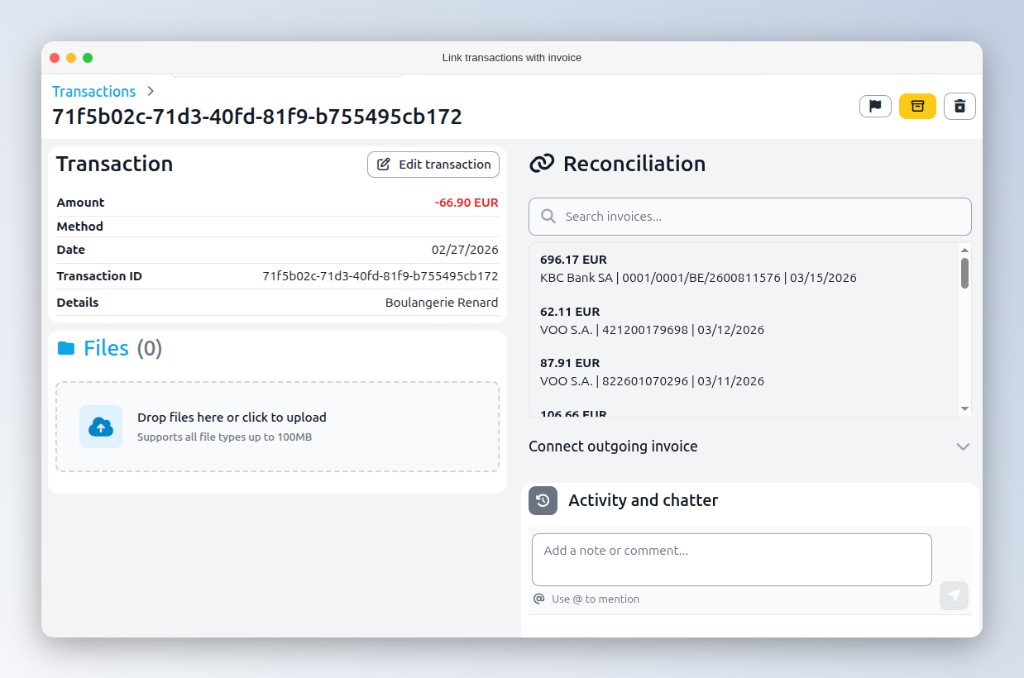
Importez vos relevés et les paiements sont rapprochés des factures ouvertes par référence, ou suggérés par montant. Payées, en retard et paiements partiels dans une seule liste claire.
Ajoutez un bouton de paiement immédiat aux factures envoyées par courriel. Le client paie par carte, Bancontact ou iDEAL, et la facture se marque elle-même comme payée. Le jour même, pas le mois suivant.
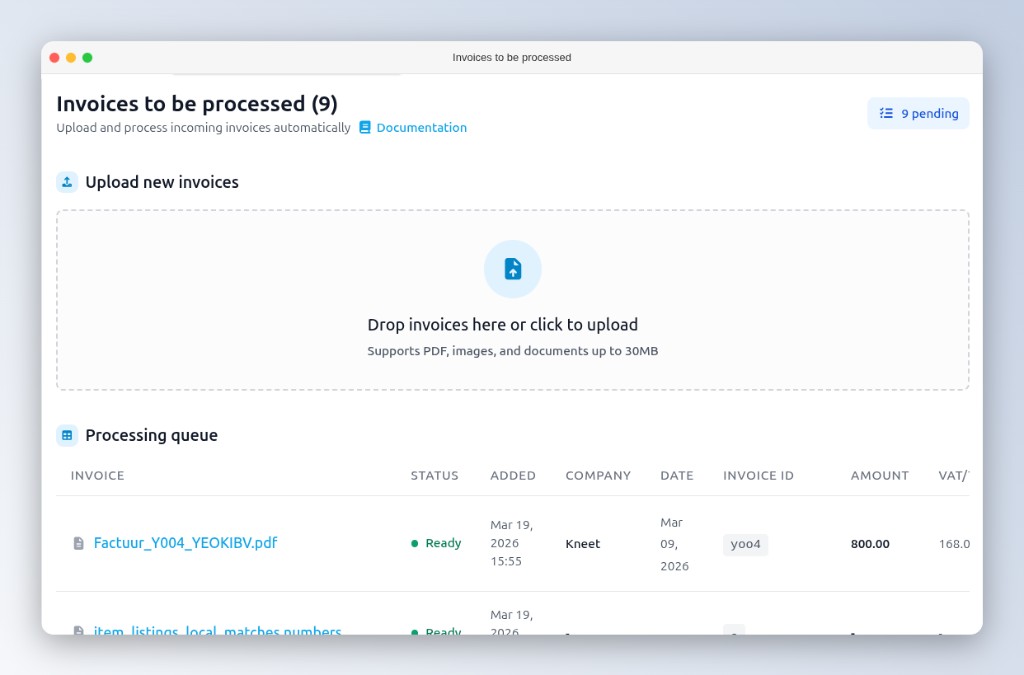
Téléchargez le PDF. Vérifiez, ne ressaisissez pas.
Lorsqu'une facture fournisseur arrive, vous déposez le PDF dans Gem Logic. L'IA la lit et remplit les champs. Votre travail se réduit de la saisie de données à une vérification rapide.
- Fournisseur reconnu par numéro de TVA
- Montants et TVA extraits par ligne
- Chaque facture stockée numériquement et consultable
Le relevé se vérifie lui-même contre vos factures.
Importez vos relevés bancaires et Gem Logic rapproche les paiements entrants des factures ouvertes. Les paiements avec référence structurée sont rapprochés automatiquement ; pour les autres, des suggestions sont faites en fonction du montant.
- Rapprochement automatique par référence structurée
- Suggestions basées sur le montant pour les paiements non structurés
- Factures ouvertes avec ancienneté, paiements partiels suivis
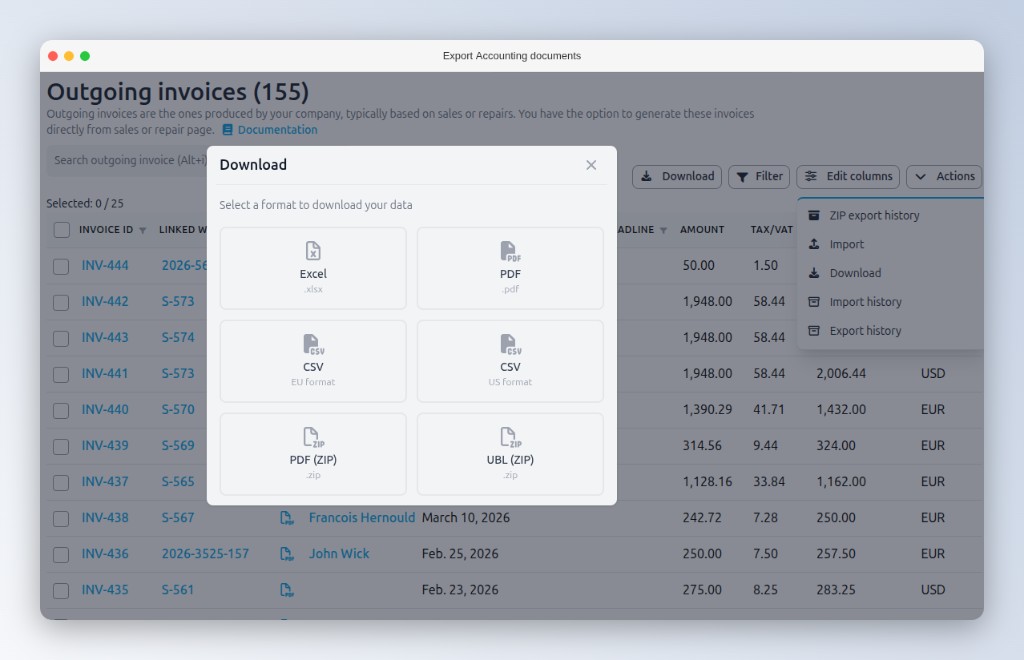
Données structurées en entrée, factures comptables réduites en sortie.
Exportez les journaux de ventes et d'achats, envoyez les factures électroniquement via PEPPOL et UBL, ou synchronisez directement avec Xero ou Exact Online. Votre comptable importe au lieu de ressaisir, et arrête de vous facturer le tri.
La réparation est prête, et le moyen de la payer aussi.
Envoyez la facture par e-mail avec un lien de paiement et le client paie depuis son canapé par carte, Bancontact ou iDEAL via Stripe. Idéal pour les réparations et les commandes sur mesure lorsque le client n'est pas à votre comptoir.
- Le client clique sur le lien dans l'e-mail
- Paie avec son moyen préféré
- Facture marquée comme payée automatiquement

Chaque facture commence ailleurs dans le système.
Montrez-nous votre pile de facturation actuelle. Nous vous montrerons comment y mettre fin.
Réservez une courte démonstration et nous parcourrons ensemble la facturation, les avoirs, le rapprochement bancaire et l'export comptable avec vos propres situations. Ou démarrez un essai gratuit et envoyez votre première facture aujourd'hui.